ESP32-C6-DevKitC-1
Board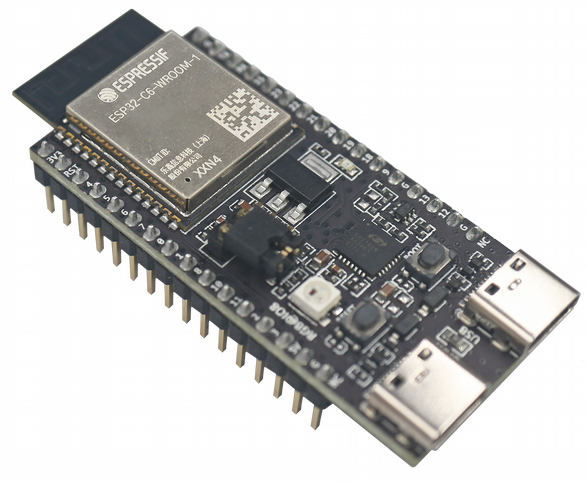
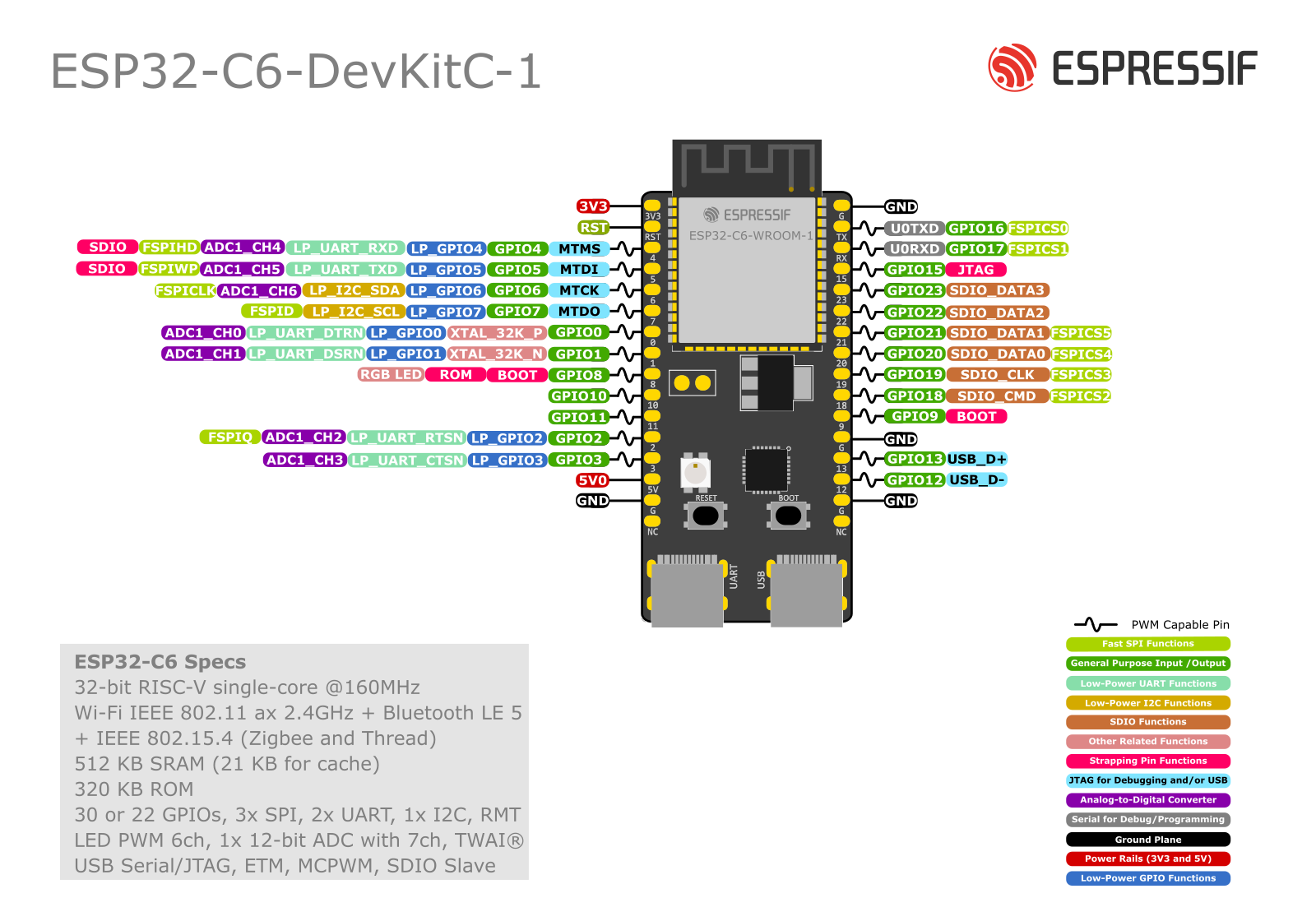
Specifications
Radiosinherited from ESP32-C6
- Wi-Fi
- Wi-Fi 6 · 2.4 GHz
- Bluetooth LE
- BLE 5.3
- Bluetooth Classic
- no
- 802.15.4
- Zigbee 3.0, Thread 1.3, Matter
USB
- Native USB
- yes
- Connector
- usb-c
Board
- Form factor
- devkit
- Battery connector
- no
- Charging
- no
Display & extras
- Extras
- rgb-led
Entry ESP32-C6-WROOM-1 board with dual USB-C (UART bridge + native USB) and a GPIO8 addressable RGB LED.
Firmware for this board
Unverified
- ESPHomeUnverifiedweb flasher
Flash ESPHome
Unverified esp-atlas asserts this board↔firmware link at the shown trust tier — it does not guarantee your specific unit or the current firmware version. Flashing can erase keys/config and can brick the device. At your own risk.
Caveat: ESPHome's `esp32:` component targets a standard Espressif devkit per chip variant by default; the Espressif ESP32-C6-DevKitC-1 is that reference board for `variant: esp32c6`, so any esphome YAML with that variant (or no board override) runs on it unmodified.
- RuViewUnverified
Flash RuView
Unverified esp-atlas asserts this board↔firmware link at the shown trust tier — it does not guarantee your specific unit or the current firmware version. Flashing can erase keys/config and can brick the device. At your own risk.
Caveat: The firmware's C6 support is first-party and well cited: `sdkconfig.defaults.esp32c6` sets `CONFIG_IDF_TARGET="esp32c6"` with `CONFIG_ESPTOOLPY_FLASHSIZE="4MB"`, the `v0.8.8-esp32` release ships `esp32-csi-node-v0.8.8-c6-4mb-flash-bundle.zip` ("Fresh ESP32-C6 installation using the supported 4 MB layout"), and the README calls the C6 its research target. What is NOT cited upstream is this exact board. RuView's root README hardware table lists its "ESP32-C6 research node" against a generic "ESP32-C6-DevKit ($6-10)", and its transport test notes say only "Two ESP32-C6 boards" — no model number anywhere. That generic name is ambiguous between the two C6 devkits this atlas catalogues, `esp32-c6-devkitc-1` and `esp32-c6-devkitm-1`; the DevKitC-1 is the fuller reference board and the likelier reading, but picking it is our inference, which is why the recipe stays `unverified`. Note also that this board record carries 8 MB of flash while RuView ships only a 4 MB C6 layout; the 4 MB bundle boots on an 8 MB part, it simply does not use the extra flash. No `flash` block is declared: the bundle is a four-file install (bootloader 0x0, partition-table 0x8000, otadata 0xf000, app 0x20000) and the bare `.bin` asset is the application image alone.
- WLEDUnverified
Flash WLED
Unverified esp-atlas asserts this board↔firmware link at the shown trust tier — it does not guarantee your specific unit or the current firmware version. Flashing can erase keys/config and can brick the device. At your own risk.
Caveat: An official `esp32c6dev_8MB` build environment exists, but no ESP32-C6 binary ships in the current release and the installer offers no C6 build: source build only, untested here.
Notes
Before you flash
- J5 current-measurement header: its jumper must be fitted (factory default = jumper on). Without it, per the user guide, "power supply between the module and peripherals on the board is cut off" -- the USB-to-UART bridge still enumerates and the power LED still lights, but the ESP32-C6 itself is unpowered.
- Two USB Type-C: a UART-bridge port and the native ESP32-C6 USB 2.0 full-speed port
- Addressable RGB LED on GPIO8
- Based on ESP32-C6-WROOM-1(U) with 8 MB flash; Wi-Fi 6 / BLE 5 / 802.15.4
- Dimensions only in a separate Dimensions PDF (omitted)
- io.gpio_free=16 DERIVED, not quoted (SPEC-io-power.md §5.3). Header J1+J3 break out 23 pads total (quoted from the user guide pin tables: J1 = GPIO 0-8,10,11; J3 = GPIO 9,12,13,15-23). Subtracting esp32-c6's soc.reserved_pins that are exposed -- strapping {8,9,10,11,15} (5) and usb_flash_tied {12,13} (2) -- gives 23 - 5 - 2 = 16. Math not vendor-stated; verify before treating as exact.
Verify my board
Reads the connected chip over USB and checks it against what esp-atlas cites for ESP32-C6-DevKitC-1 — over Web Serial, no backend, nothing leaves your browser.
In-browser verify needs Web Serial: Chrome or Edge on a desktop. Safari, Firefox and phones cannot do it.
Serial monitor
Not connected.